Motivation
While working with Claude Code I wanted to see at a glance how much of my 5-hour plan I had used and what the current session was costing, without breaking my flow for a browser tab. A native menu bar app is the right place for that kind of status data.
What It Shows
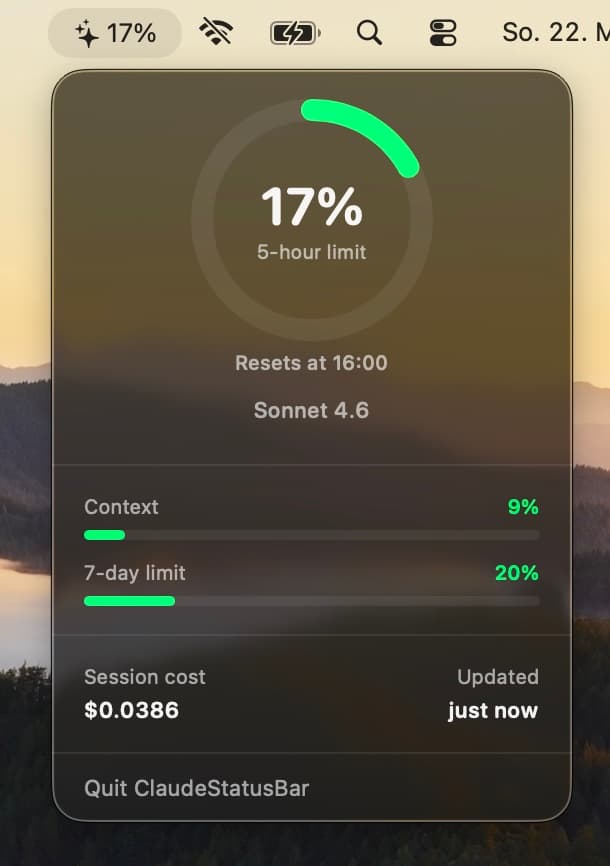
The menu bar icon displays 5-hour plan utilization with a ✦ prefix and color-coded status: green below 50 %, yellow from 50–79 %, red at 80 % and above. If more than 5 minutes pass without a Claude response, the icon dims, a quiet signal that the data may be stale.
Clicking the icon opens a popover with:
- a circular progress ring for the dominant metric (plan utilization if available, context window otherwise)
- horizontal progress bars for context window % and 7-day plan utilization
- session cost in USD and the current model name
- the reset time for the active 5-hour window
Architecture
The app has two independent data sources that update on different schedules.
Plan Utilization: Anthropic OAuth API
Every 5 minutes, the app calls https://api.anthropic.com/api/oauth/usage to fetch utilization for the current 5-hour and 7-day windows. No separate login is needed: the OAuth token is read directly from the macOS Keychain, where Claude Code stores it under the service key Claude Code-credentials. The request uses a Bearer authorization header and the anthropic-beta: oauth-2025-04-20 header.
Session Details: statusLine Hook
Claude Code's hook system can run a script after every response and expose rich session state to it. I registered ~/.claude/hooks/stop_hook.sh as a statusLine command in ~/.claude/settings.json, the only hook type that receives context_window, cost, and model data.
The script receives a JSON payload on stdin, injects a UTC captured_at timestamp using jq --arg, and writes the result atomically to ~/.claude/session_usage.json via a PID-suffixed temp file and mv. This is intentional: on the same filesystem, rename is atomic, so the app never reads a half-written file. The script also prints a human-readable status line (Claude Sonnet 4.6 | ctx 42% | $0.0312) to the terminal.
The app watches ~/.claude/, the directory and not the file directly, via DispatchSource.makeFileSystemObjectSource with .write and .rename event masks. This is necessary because the kernel only fires rename events on the parent directory, not on the old path. When the event fires, JSONDecoder with keyDecodingStrategy = .convertFromSnakeCase reads and decodes the file into Swift models.
Implementation Details
The app is a standard Swift Package using SwiftUI's @main and MenuBarExtra with .menuBarExtraStyle(.window) (macOS 13+). The menu bar label renders a sparkles SF Symbol alongside a monospaced percentage string, both changing color based on thresholds.
UsageWatcher is an @MainActor ObservableObject that owns the DispatchSource, the stale timer, and the API polling timer. After each successful file read, a 300-second Timer is set. If it fires before new data arrives, isStale flips to true and the icon dims. SwiftUI's @Published properties drive all re-renders automatically.
TokenUsageView is a 260pt-wide SwiftUI popover. The ring is drawn with Circle().trim(from:to:).stroke(style: StrokeStyle(lineCap: .round)), rotated –90° and animated with .easeOut(duration: 0.4). Progress bars use GeometryReader for proportional widths. The reset time is parsed from the ISO 8601 resetsAt field (with a fallback for fractional seconds) and formatted with DateFormatter using a locale-appropriate jmm template.
A bundled plist registers the app as a macOS LaunchAgent for auto-start on login. The critical detail is LimitLoadToSessionType = Aqua: without it, launchctl load fails with "Input/output error 5" because menu bar apps require access to the Windowserver, which only exists in an Aqua GUI session.
Design Decisions
I could have built the app with Electron, the effort would have been minimal. But a menu bar app should be invisible when you're not looking at it. Native SwiftUI means zero background overhead and a UI that fits macOS properly.
For session details I deliberately avoided polling. Claude Code already exposes this data at the end of every response, so the statusLine hook fires at exactly the right moment. Why poll an API when the push is already there?
Consequently, nothing else runs in the background: no daemon, no server. The entire app is a single binary that reads files and makes HTTP requests.
There is one non-obvious detail around filesystem monitoring: watching the file path directly misses atomic rename events. Watching the parent directory catches them correctly, a small detail with a real effect.